GeoIQ (acquired by Lenskart, 2025) · 2024
RetailIQA data product that sold without a demo
As GeoIQ's first designer, I rebuilt the RetailIQ onboarding, designed a sales-free growth journey, and made the product legible enough that a customer could adopt it without a demo.
- Role
- Founding designer, design team lead
- Client
- GeoIQ (acquired by Lenskart, 2025)
- Timeline
- 16 months, 2023–24
- Platform
- Web app
90%
First-touch completion of the new onboarding, up from 14%
112s → 48s
Time to finish onboarding, after cutting it from four screens to two
$100K ARR
Closed within 8 months of launch through the self-serve journey, without a sales cycle leading the deal
The problem
RetailIQ is GeoIQ’s location-intelligence product for retail chains deciding where to open the next store. Before design was a function inside the company, it had grown organically, and it showed:
The product was powerful under the hood, but it couldn’t explain itself. A first-time user had to sit through a sales demo before it made sense.
When I joined as GeoIQ’s first in-house designer, the job was three things at once:
- Turn the product into something a first-time user could adopt without a sales call.
- Build a design practice (team, process, system) that could keep up with the company as it grew.
- Reposition RetailIQ so the brand matched what the product was becoming.
The rest of this study walks through those three, and how they turned out to be the same problem.
Building the team
You can’t ship a product-led experience without the team and rituals to make it. So the first stretch was spent on the practice itself.
The team. I joined as GeoIQ’s only designer. As product and brand work piled up, I pitched the founders for a design team, then wrote the roles, interviewed and hired four full-time designers, graphic and product. When I left in April 2024, one of them took over as design lead.
How I ran the team. A formal review with each designer once a month, and a weekly one-to-one that wasn’t only about the work: we talked about how they were doing as well as what they were shipping. Each designer had a learning path built around what they wanted to learn next. I tried to be the mentor I didn’t have for most of my early career.
Design system, co-owned with engineering. This was pre-AI-code-gen. Every hour engineering spent guessing at spacing or reverse-engineering a variant was an hour off the roadmap. So I built the component library with the tech team: every variation documented, every token named the way their codebase would use it, every review a joint one. Engineering reviewed every component with us, so the library was as much theirs as ours.
Post-meeting constraint syncs. After every product meeting with PMs, tech head, and founders, I’d sit separately with the tech lead to walk through the constraints: what was expensive to build, what was fragile, what the data model wouldn’t support. The next round of designs was drawn with those constraints already inside them, not discovered in review.
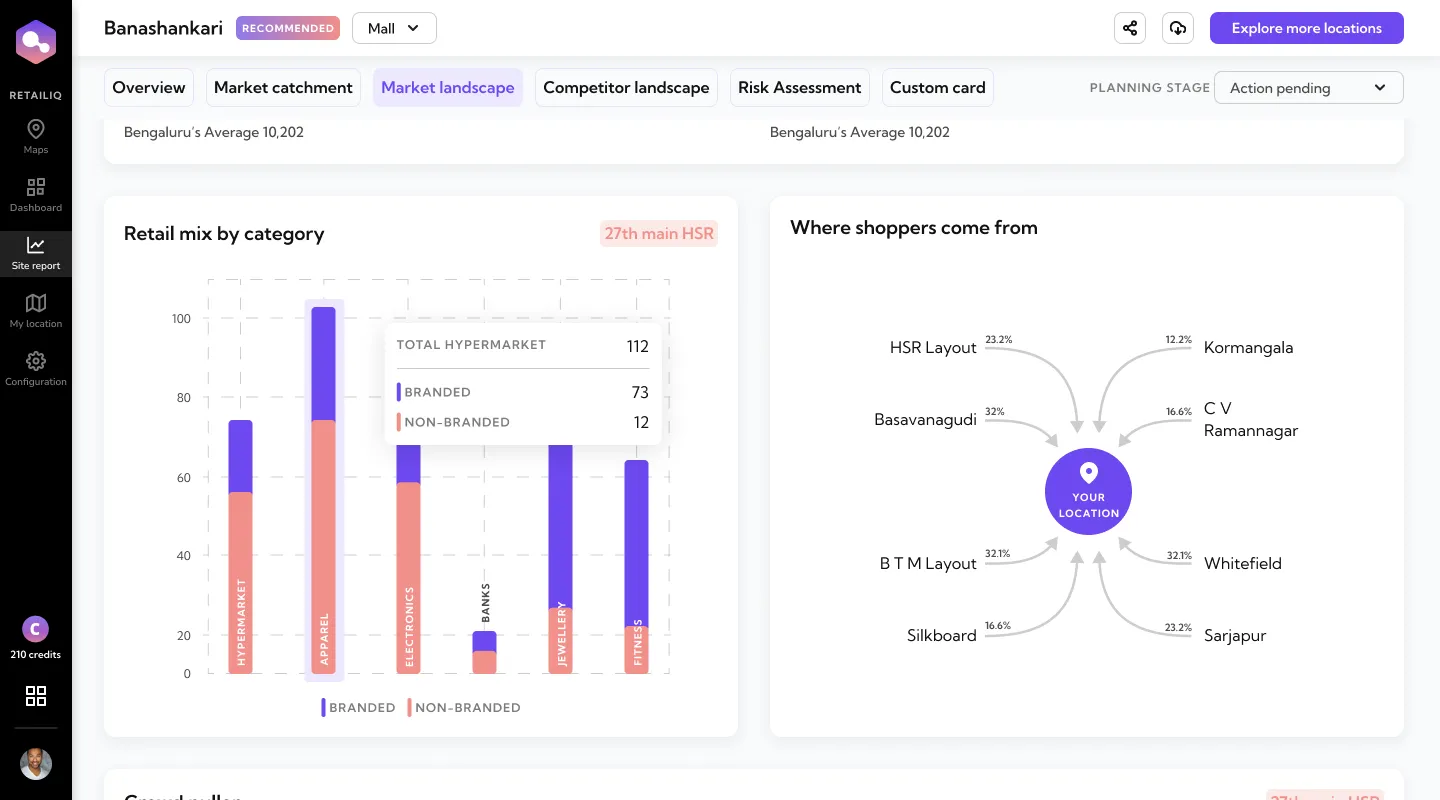
I brought heatmapping into the product. Microsoft Clarity wasn’t there when I joined, so I asked for it straight away, installed it, and ran weekly readouts for the PMs and founders. It showed us where people got stuck and where they dropped off, and most of the key decisions below started there. Onboarding took too long and people left partway through. The old screens, the site report included, drew a lot of misclicks. And tables of numbers got scrolled straight past, which is why “Where shoppers come from” became a diagram instead of another table.
I wanted design to come to product meetings already knowing the constraints and the user evidence.
Who we were designing for
These are proto-personas, not research: the team wrote them from what we knew about the people buying and using RetailIQ. One approves new stores; the other finds them.
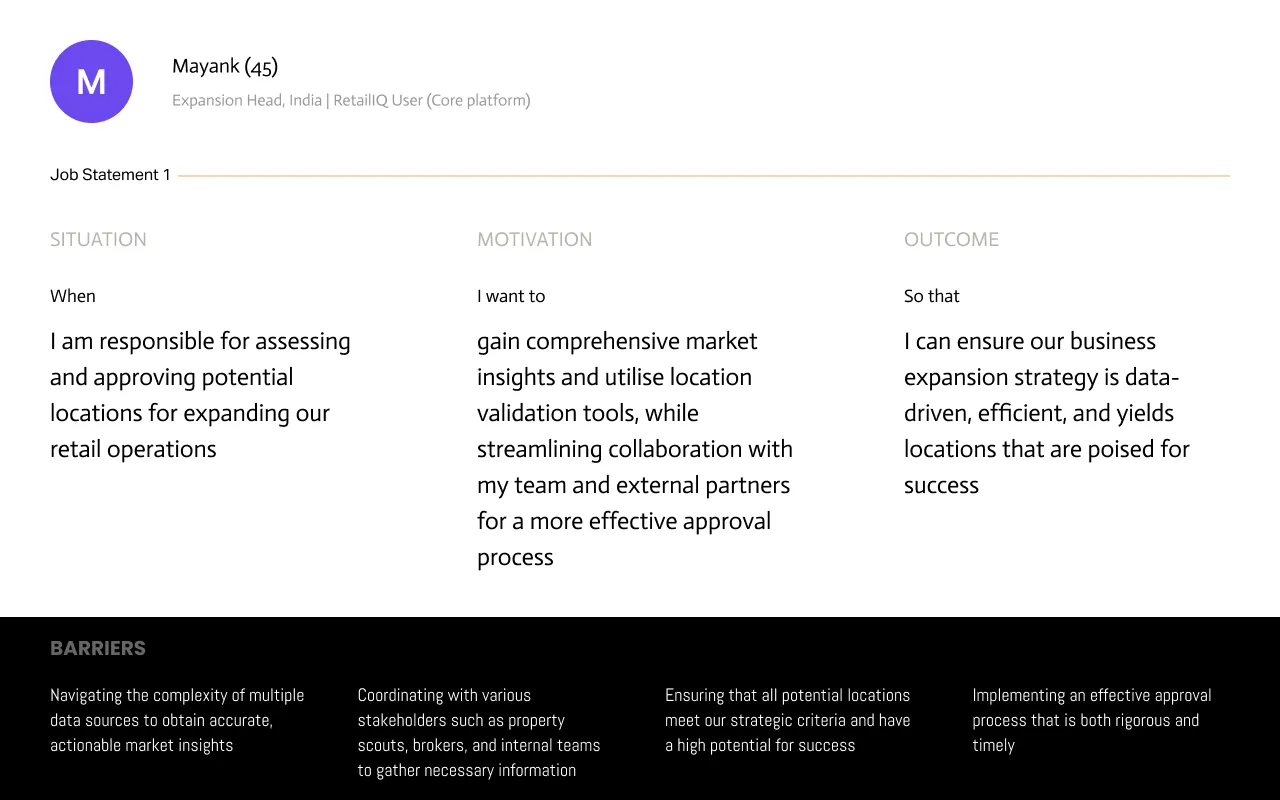
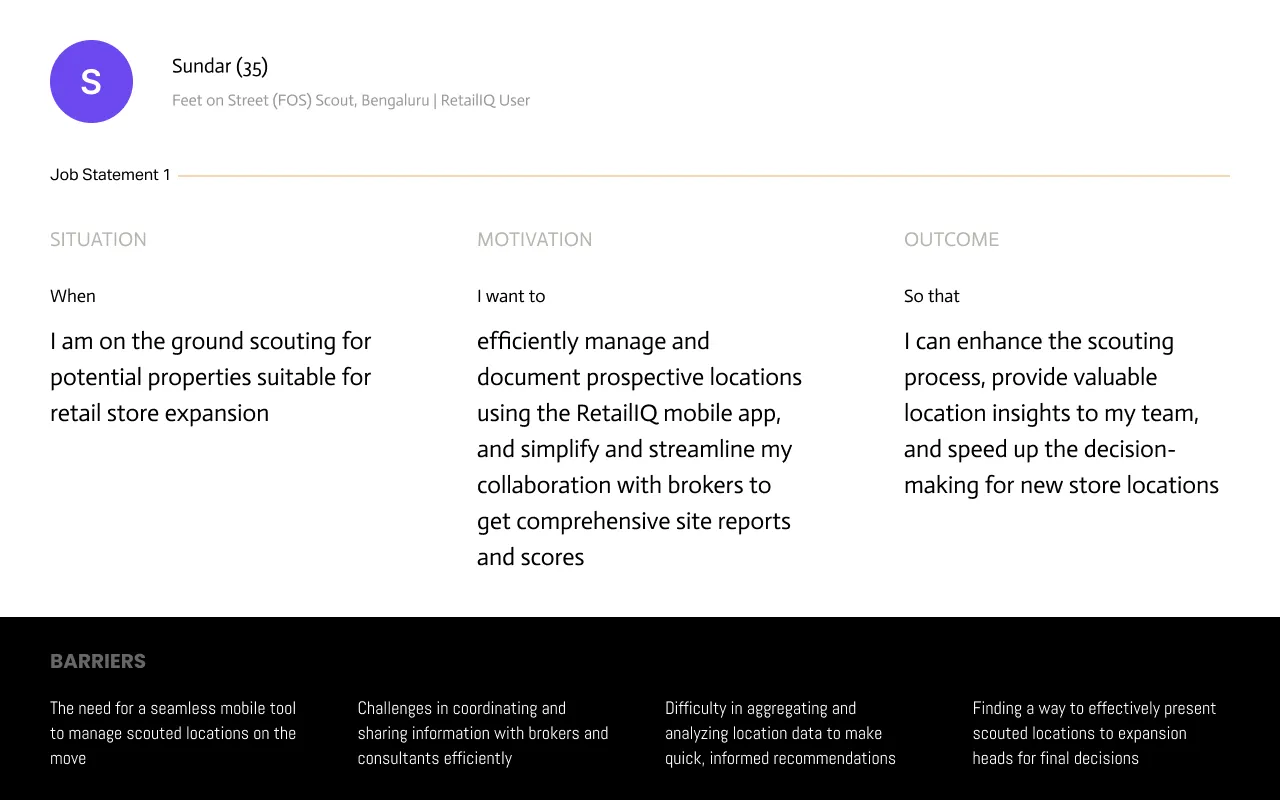
Between them, their barriers came down to a handful of problems:
- 01
Too many data sources
Navigating multiple sources to get market insights that are accurate and actionable.
- 02
Too many people in the loop
Coordinating property scouts, brokers, consultants and internal teams to gather what they need.
- 03
Hard to tell a good site from a bad one
Making sure every potential location meets the strategic criteria and has real potential.
- 04
Slow, heavy approvals
An approval process that has to be both rigorous and timely.
- 05
No tool for the field
Managing scouted locations on the move, without a proper mobile tool.
- 06
Findings that never reach the decision
Presenting scouted locations to expansion heads for the final call.
Those, plus the problem the business started with, turned into three questions to design for. Most of our customers came in through sales calls, and we wanted RetailIQ to grow on its own, product-led:
How might we…
let a first-time user adopt RetailIQ without a sales call?
How might we…
help someone who doesn’t yet know where to look find a location worth checking?
How might we…
make a site report readable at a glance, not just complete?
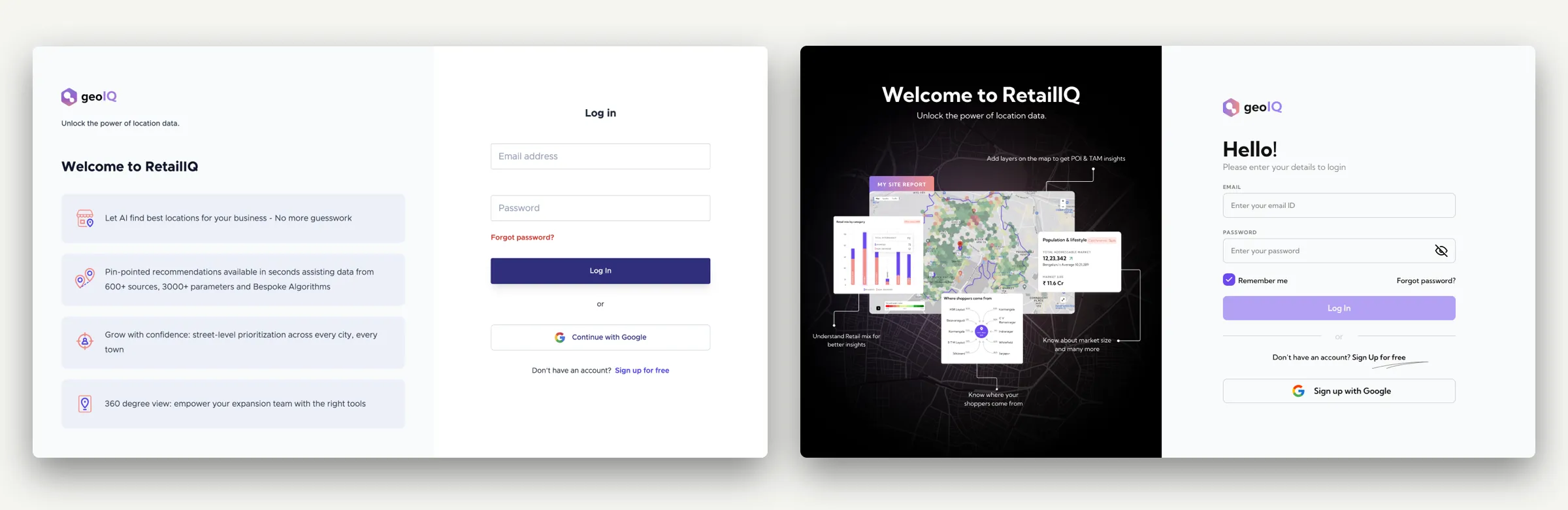
Before and after
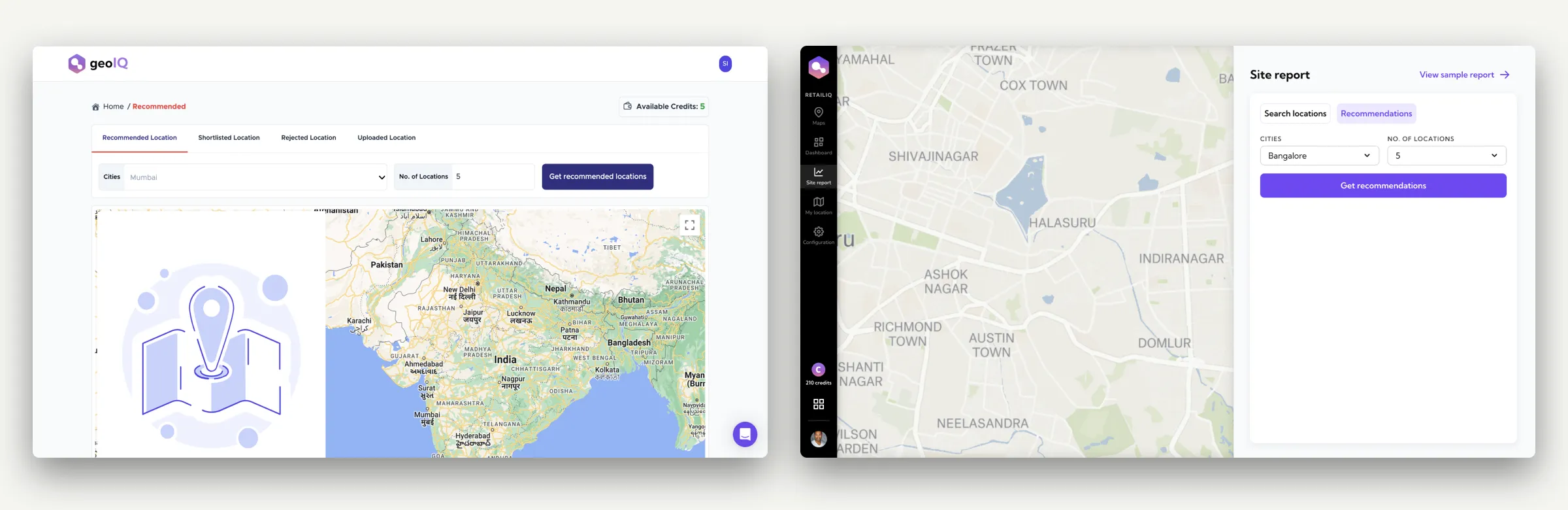
Key decisions
Decision 01
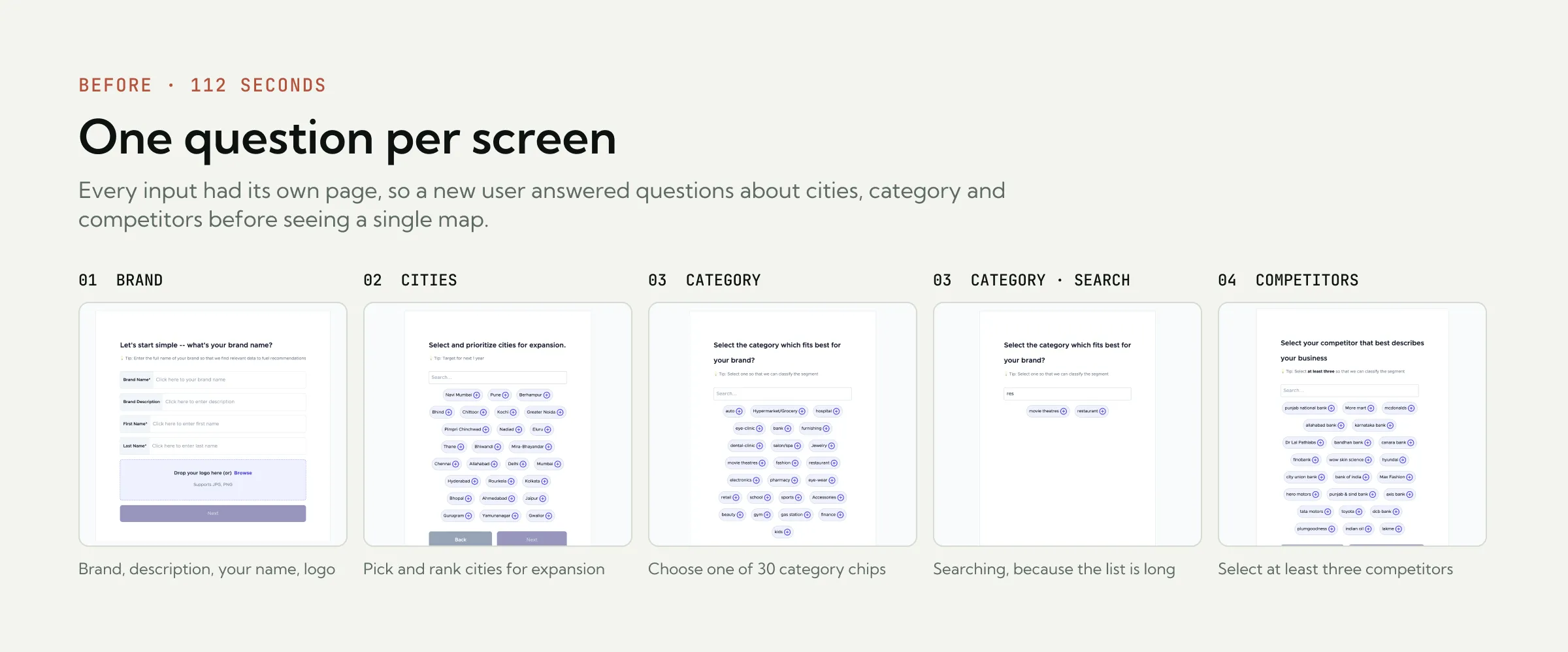
Four screens, or two
- On the table
- Keep the 4 screens, one question each
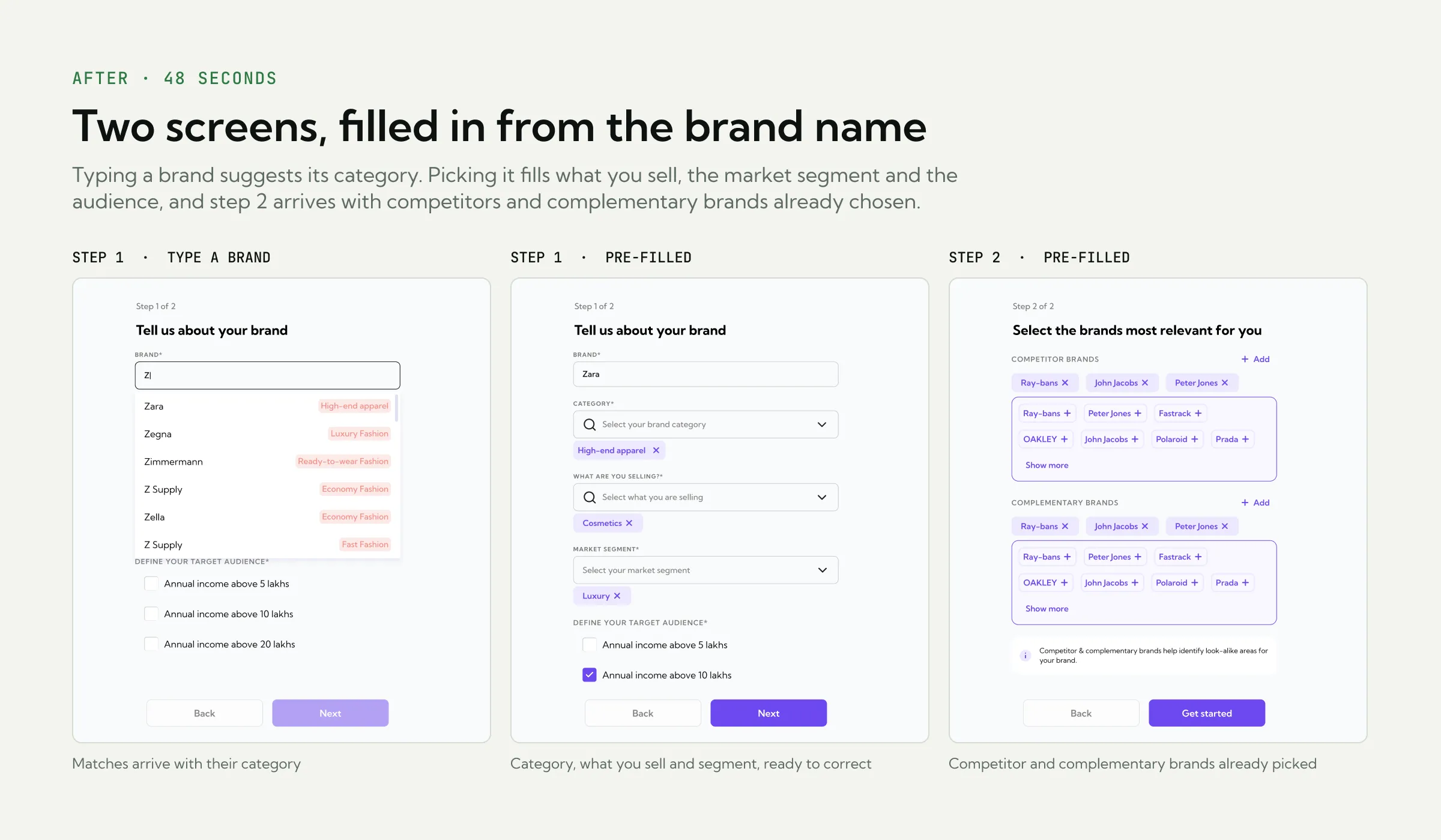
- 2 screens, filled in from the brand name
- What I chose
- Two screens. Anything not needed to see a map with your own data moved later, and the brand name filled in most of the rest.
Why
Onboarding completion on first touch was the first product metric we went after. Each input was its own screen: 4 steps before a user saw a single map, and 112 seconds end to end. The ones who finished had usually been walked through it by a salesperson or PM on a call, so sales cycles were being burned on explaining the product instead of closing it.
Fewer clicks meant fewer drop-offs. Each screen asked a question a new user couldn’t answer yet, and most gave up before they saw a map. So I introduced smart defaults and suggestions based on brand name and category: a user typing “Thirdwave Coffee” got a category, region and comparison set pre-populated, and could correct it if wrong instead of filling it in from scratch. And the first screen stopped saying “give us your inputs”, and started saying “here’s what your first report will look like. Confirm?”
Decision 02
Show the output before asking for input
- On the table
- A product tour inside the product, the way most SaaS tools onboard
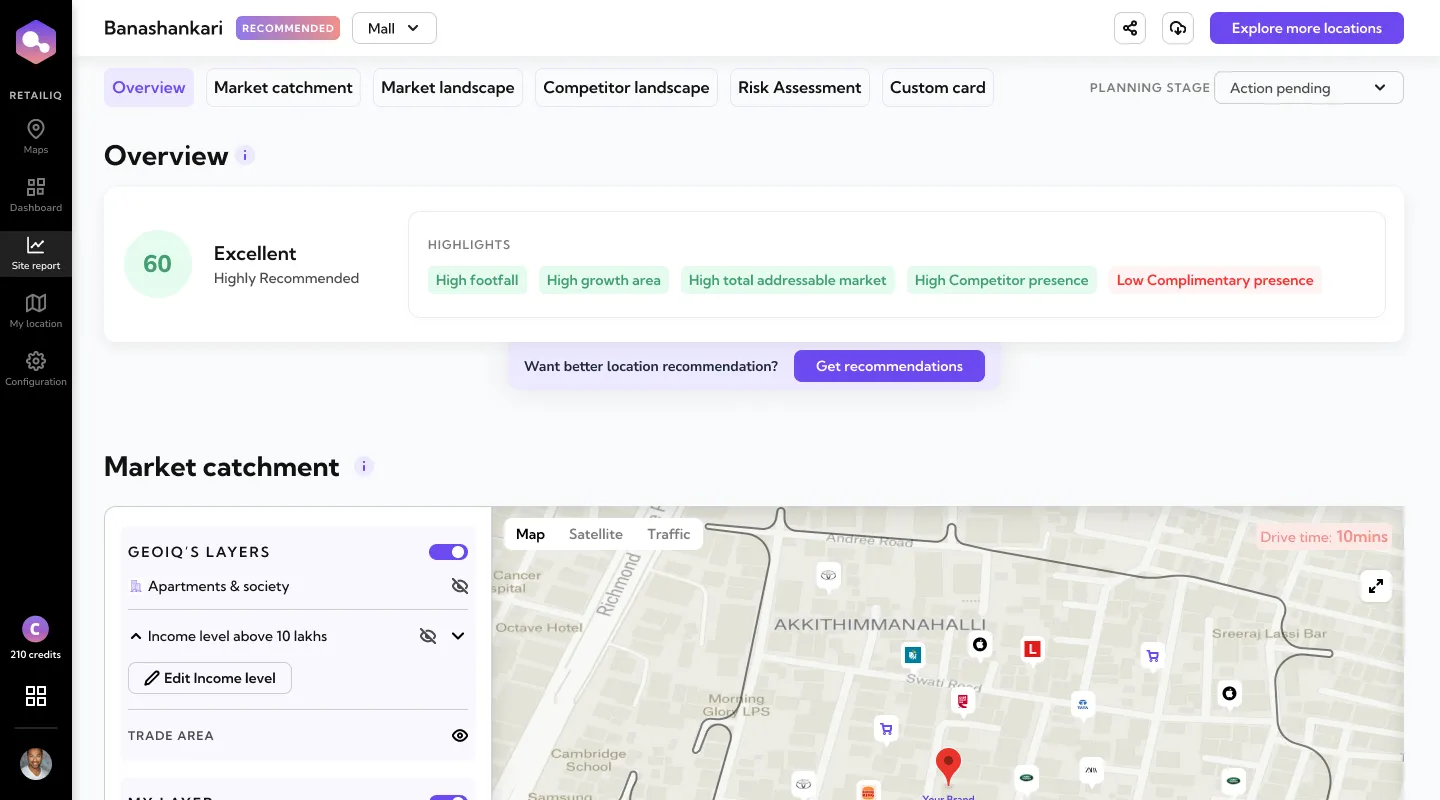
- A real sample report inside the product
- What I chose
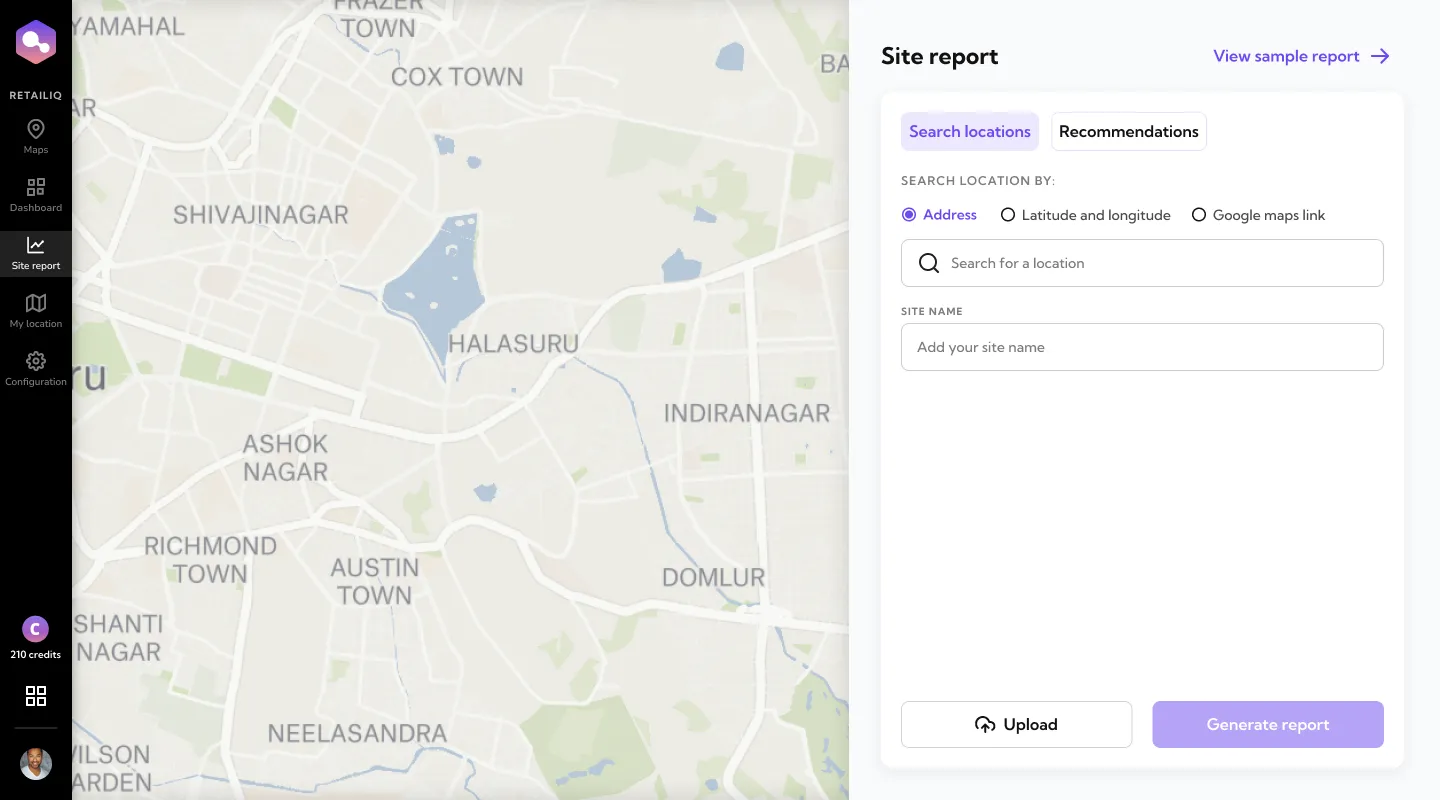
- A sample report, always one click away in the nav. The how-to tour stayed on the website.
Why
If the product could explain itself, growth didn’t need a sales-heavy motion. New users landed in RetailIQ with 10 credits, enough for two site reports. A tour teaches you where the buttons are; it doesn’t show you what you’ll get. So the how-to tour, built with a third-party tool, stayed on the website, and inside the product a sample report sat one click from the site-report screen, for anyone not ready to spend a credit on their own location.
Decision 03
Two kinds of user, two ways in
- On the table
- Search only: bring your own address
- Recommendations only: the product suggests sites within a city
- Both, as two tabs on one screen
- What I chose
- Both, side by side: Search locations for people who know the site, Recommendations for people who don't yet know where to look.
Why
There were two kinds of user. One knew exactly which site they wanted to check, and could search by address, latitude and longitude, or a Google Maps link. The other didn’t yet know what, or where, they were looking for: they entered a city and how many locations to shortlist, and RetailIQ came back with candidates ranked by fit.
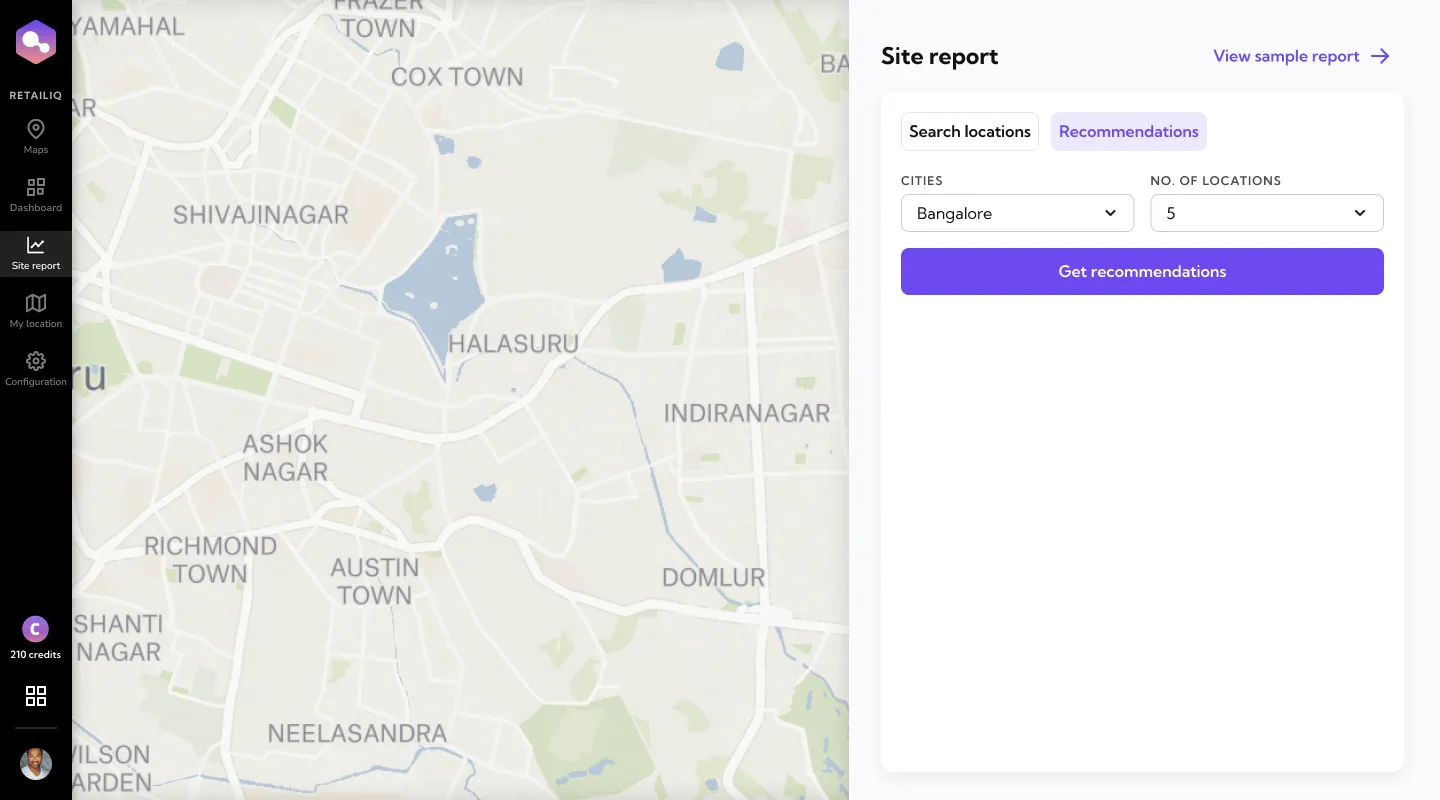
The moment intent flipped was consistent: a user would try Recommendations first (“show me what you’ve got”), then use their remaining credits on their own locations. The product had earned the second click.
Decision 04
A map you can switch layers on
- On the table
- Numbers only, the way the report worked before
- An interactive map, built on data GeoIQ already had
- What I chose
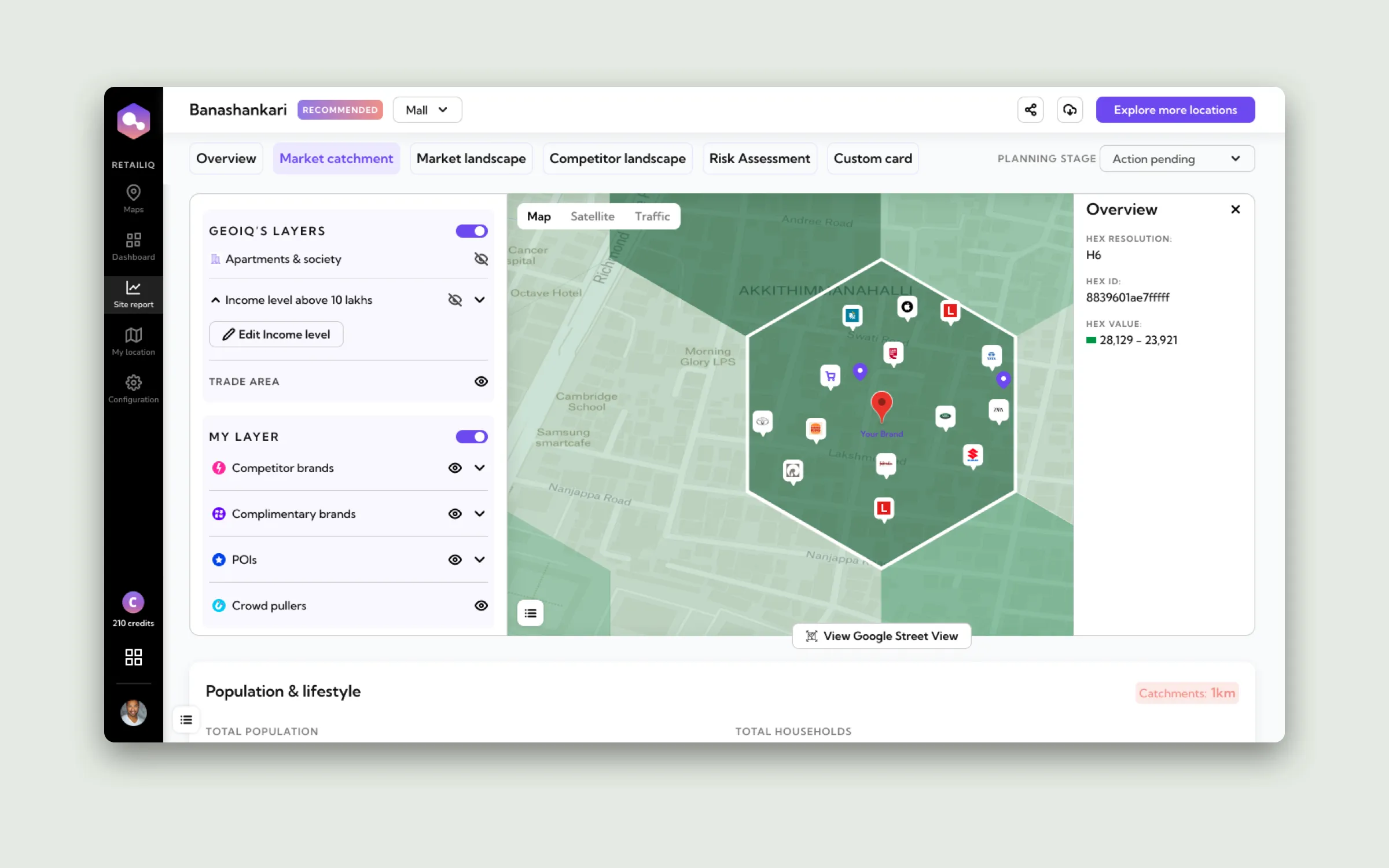
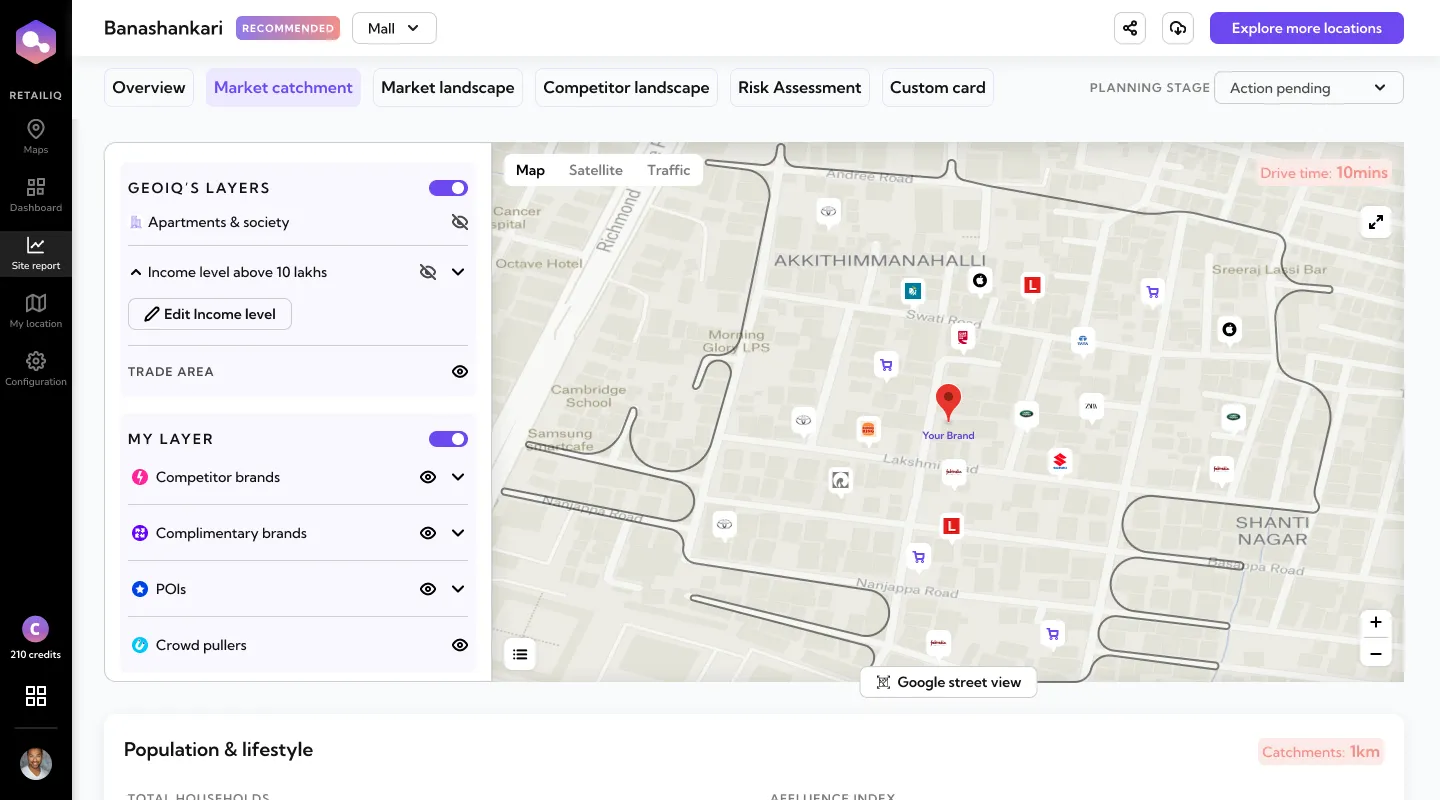
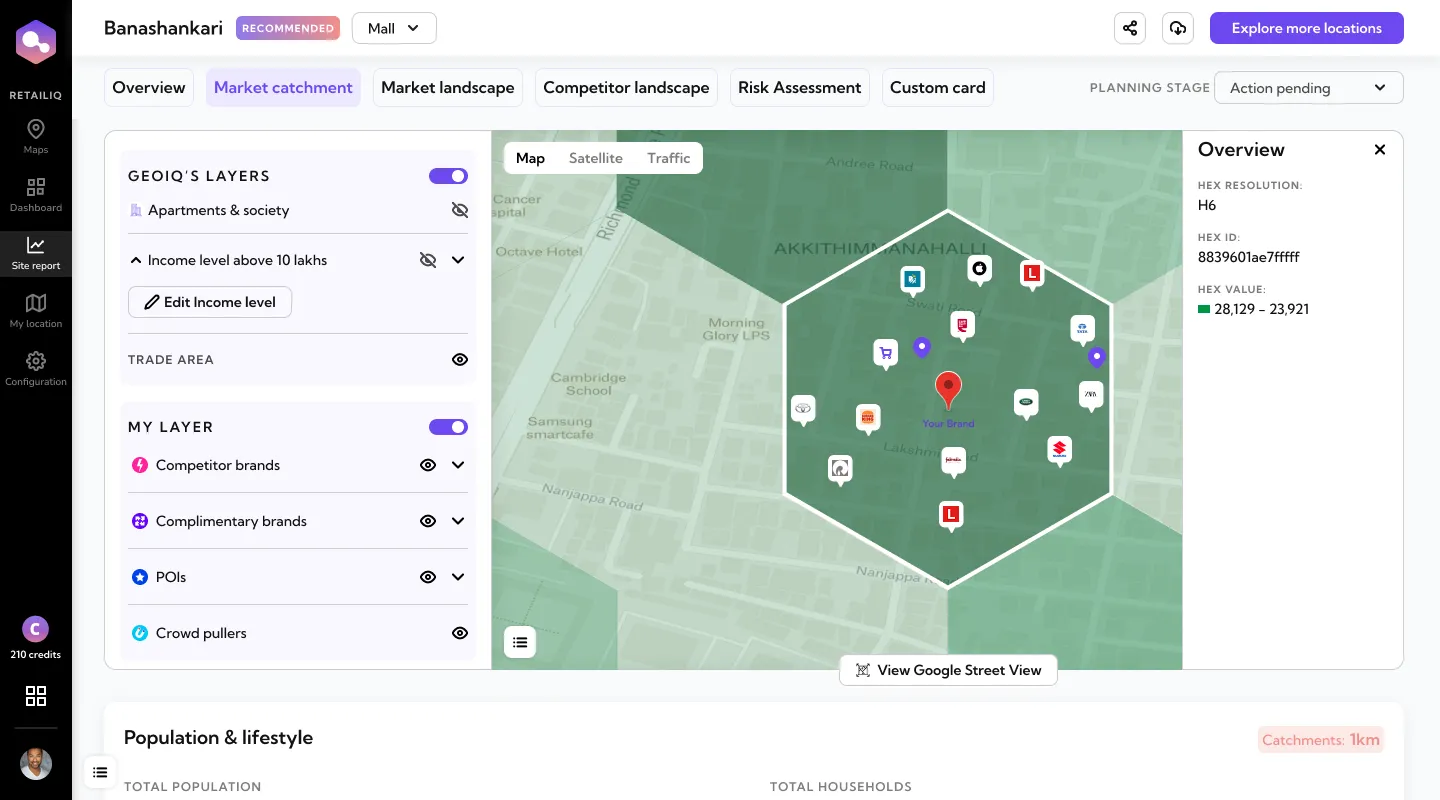
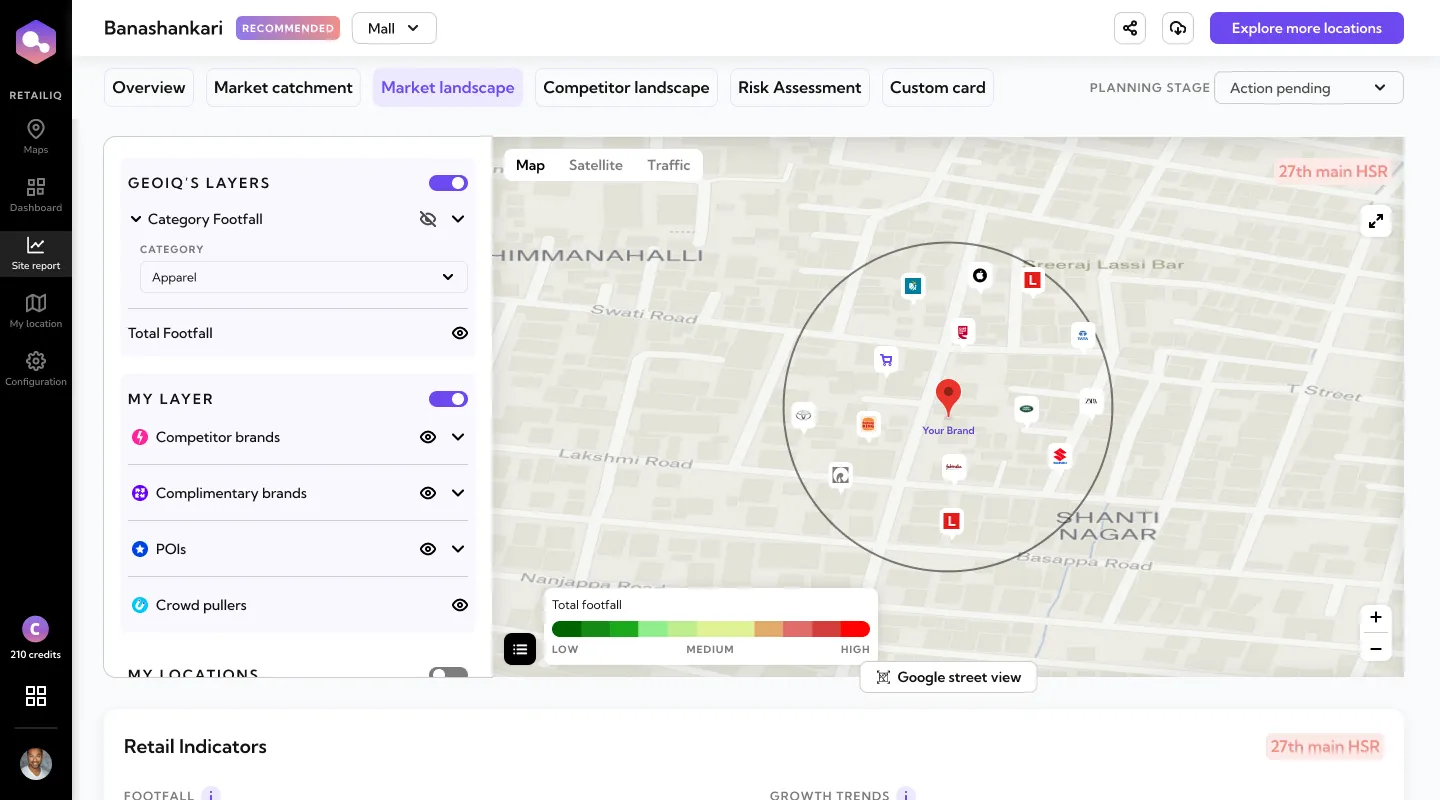
- An interactive map for market catchment and market landscape, agreed together in a product meeting: GeoIQ's layers change with the section, and My layer carries the user's own brands from onboarding.
Why
Some of the report was already there when I joined: the overview score, population and lifestyle, retail indicators, competitor landscape and risk assessment. What I added were the sections that let a customer explore the area around a site. GeoIQ already had the data: apartments and societies, income levels, the trade area, footfall by category. We wanted to show it for one catchment, on a map you explore yourself. GeoIQ’s layers change with the section: market catchment shows apartments and societies, income level and the trade area; market landscape shows category footfall.
My layer is the same on both maps, and it starts from onboarding: the competitor and complementary brands you picked there are already on the map. You can add more brands and points of interest; crowd pullers are shown for the catchment, but not added by hand. The answers you gave in the first 48 seconds follow you into every report.
Decision 05
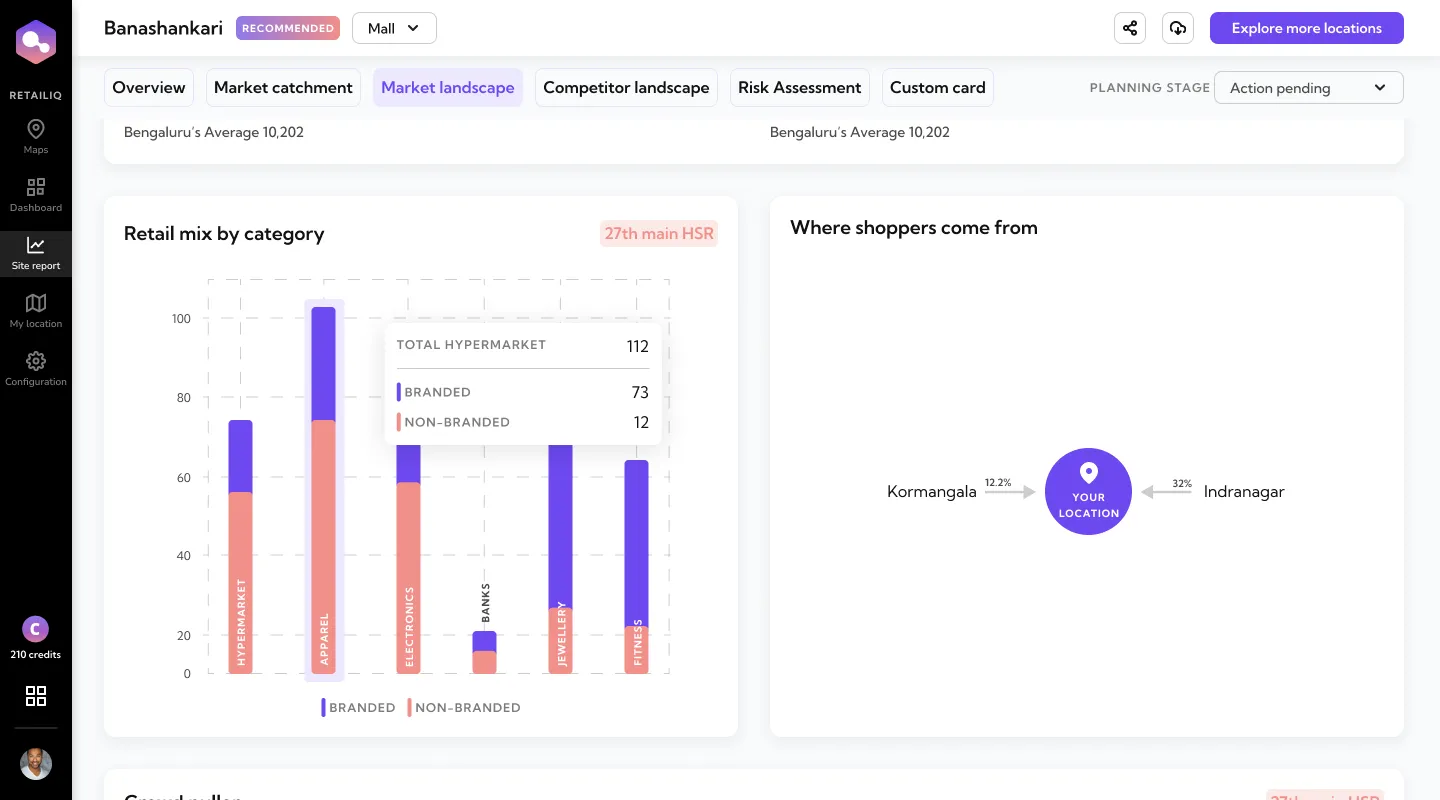
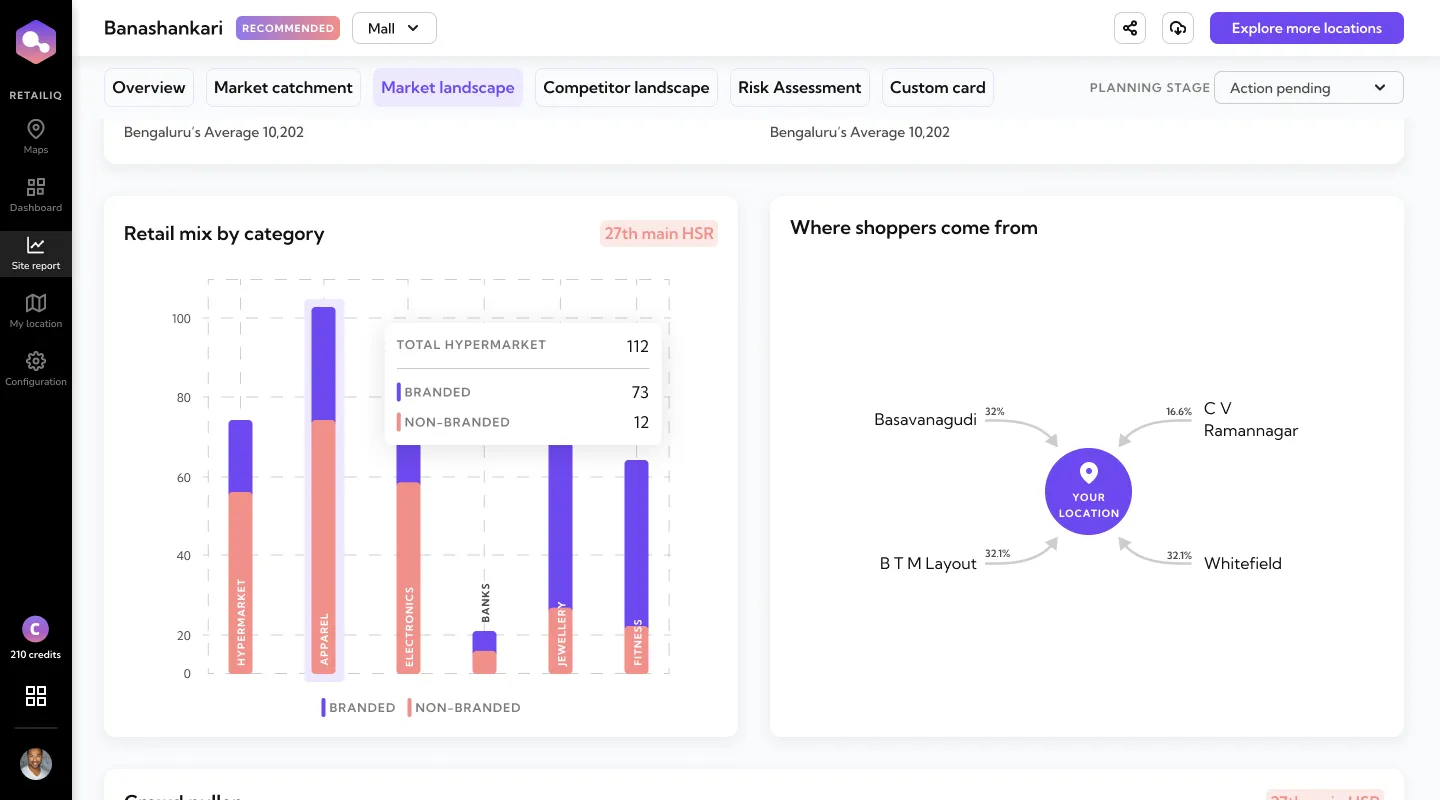
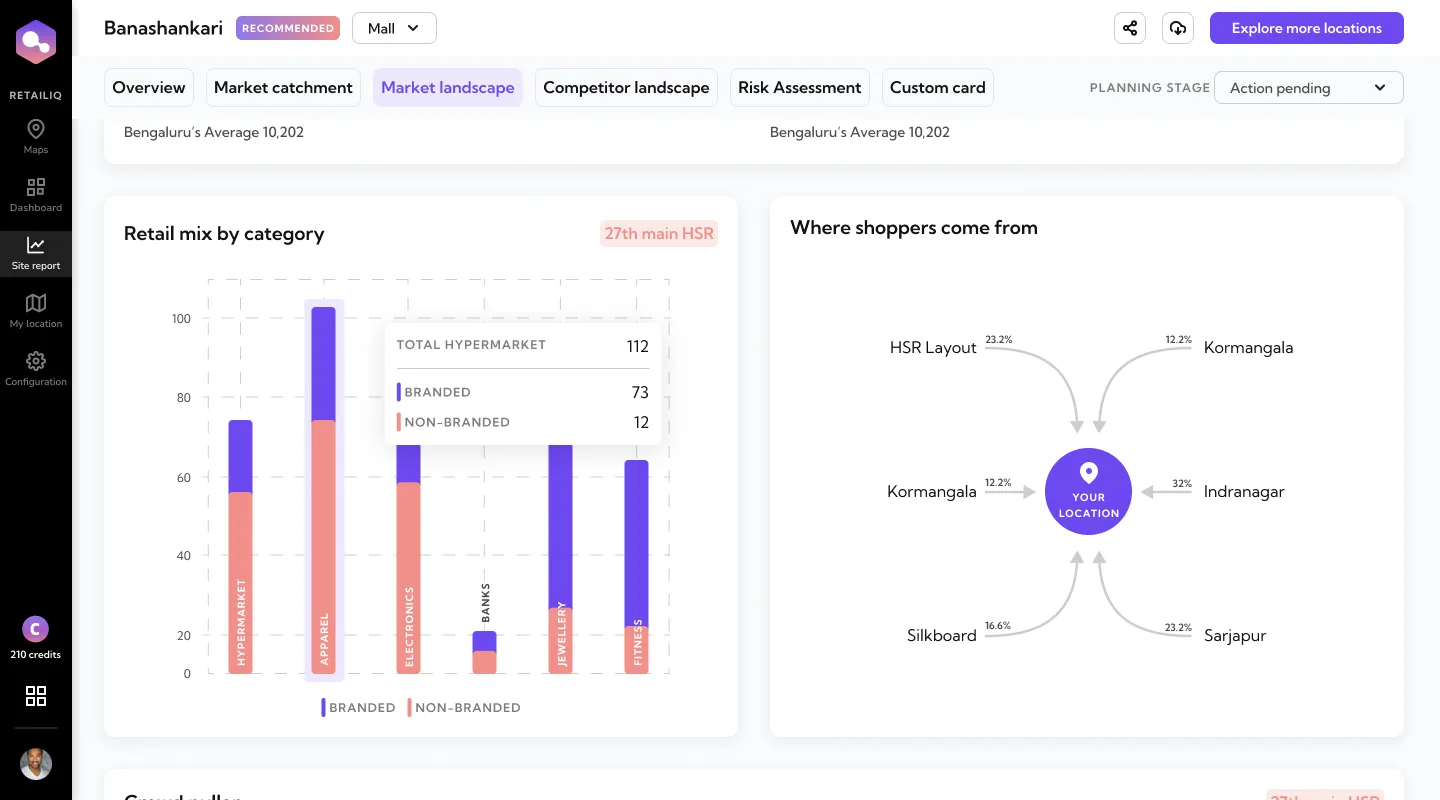
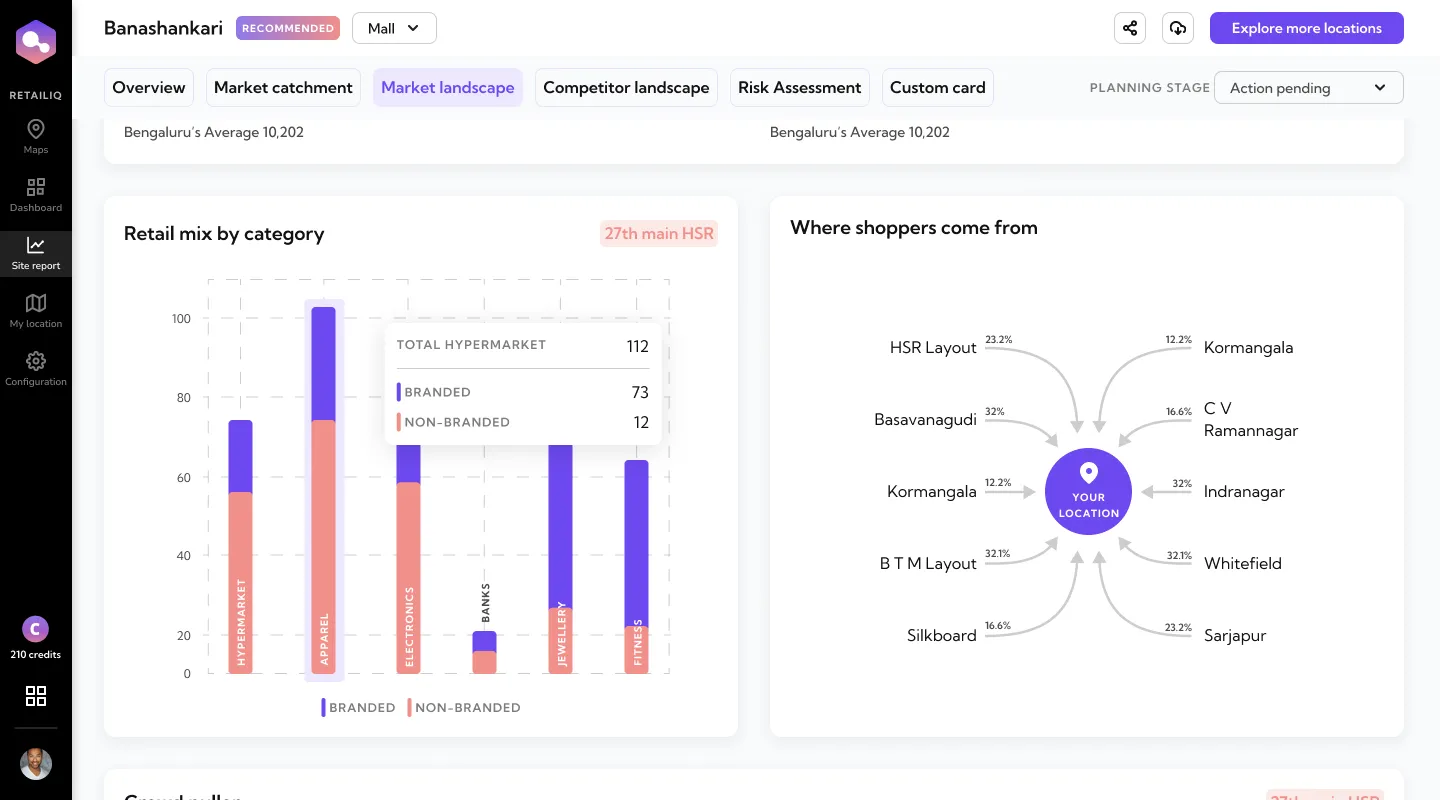
Where shoppers come from
- On the table
- A table of neighbourhoods and percentages
- A diagram of shoppers flowing into your location
- What I chose
- The diagram, which I pitched: arrows from each neighbourhood into your location, each with its share.
Why
Clarity had already shown us that tables of numbers got scrolled past. A table of neighbourhoods would have been one more. Drawn as arrows into “Your location”, the same numbers read as people travelling to your store, and the biggest source is obvious at a glance. It had to hold up whether shoppers came from two neighbourhoods or ten.
The system we built with engineering
With five designers and a busy engineering team, the system was how we stayed consistent without extra meetings: one component library, built with the tech team and named the way their codebase named things. Engineering reviewed every component with us, so it was theirs as much as ours. RetailIQ never had a written style guide; the library was the guide.
See the full system: colour, type, grid and components
Foundations
Colour
One purple does all the asking: primary buttons, links, anything the user can act on, with three lighter steps for hover and selected states. The rest is near-black text on white, and four semantic pairs, each a strong colour with a pale fill behind it.
Brand
- #6D48EFPurple5.5:1 AA
- #9B83F4Purple 4003.0:1 AA large
- #EDE8FFPurple 100
- #F9F8FFPurple 50
Text and lines
- #111111Ink18.9:1 AAA
- #4A4A4AGrey 7008.9:1 AAA
- #7C7C7CGrey 5004.2:1 AA large
- #CDCDCDLine1.6:1 low
- #ECECECLine light
Semantic
- #439F6ESuccess3.3:1 AA large
- #E4FCEFSuccess fill
- #F93232Error3.8:1 AA large
- #FEF4F4Error fill
- #FFB82EWarning1.7:1 low
- #FFF7EAWarning fill
- #F19089Coral2.3:1 low
- #FCE9E7Coral fill
Contrast shown against the app background, #FFFFFF.
Type
Kumbh Sans throughout, on a scale where each step is roughly 1.2 times the one below it. Medium 14 is the workhorse: it sets most of the text in the product. The step names are mine; the sizes and weights are the ones the screens use most.
Typeface
Kumbh Sans
- Regular 400
- Medium 500
- SemiBold 600
- Bold 700
- Unlock the power of location data.
- Unlock the power of location data.
- Unlock the power of location data.
- Unlock the power of location data.
- Unlock the power of location data.
- Unlock the power of location data.
- Unlock the power of location data.
- Unlock the power of location data.
- Unlock the power of location data.
Grid
Twelve 79px columns on the web, starting 104px in so the side navigation sits outside them; four on the phone.
- Columns
- 12
- Margin
- 104 / 36
- Gutter
- 32
- Columns
- 4
- Margin
- 24
- Gutter
- 24
Components
Buttons and fields, built live from the library’s variants: an 8px radius everywhere, SemiBold labels, and three button sizes. Each field has its own colour for hover, focus, warning and error.
Primary
- Large: 48px, 20px label
- Normal: 47px, 16px
- Small: 32px, 14px
- Inactive, at 50%
- With icon
Secondary and tertiary
- Secondary
- Secondary, inactive
- Tertiary
Input fields
- Inactive
- Hover
- Focused
- Disabled
States that need attention
- Warning
- Error
Search, dropdown and password
- Search
- Dropdown
- Password
Results
- The report: market catchment and where shoppers come from became the sections people used most.
- Onboarding: first-touch completion rose from 14% to 90%, and the flow took 48 seconds, down from 112. Sales stopped being onboarding’s crutch.
- Growth: $100K ARR closed through the redesigned journey within 8 months of launch, without a sales cycle leading the deal. Customers acquired during this period spanned QSR, coffee, fashion eyewear, pet retail, jewellery, mattress, and fintech, a category range that validated the “any brand can self-serve” thesis. Brand names are under NDA; happy to share on a call.
- The website, rebuilt in the same motion, drove +20% engagement and +15% conversion, with materially better customer feedback in the follow-up survey.
What I can’t show: clean downstream numbers on trial-to-paid. That instrumentation wasn’t in place at the time, which is one of the things I’d fix if I did this over.
About the Lenskart connection. RetailIQ was originally built to solve Lenskart’s problem (finding the right location for their next store), and engineers had the core working before I joined. My job was to close the gap between what the product could already do and what a first-time customer, who wasn’t Lenskart, could understand of it. When Lenskart acquired GeoIQ in 2025, it was the closing of a loop that had started before design was a function inside the company.
What I learned
- How the team works shows up in the product. Keeping the system in step with engineering let a small team ship more than its size suggests.
- The numbers moved because users had fewer decisions to make up front. The 48-second onboarding came from asking less up front: anything a user didn’t need to see their first map moved later, and the brand name filled in the rest.
- A product that explains itself saves the sales team time. Every customer who onboarded alone was a demo nobody had to give.
- Someone has to fight for users. If it’s not you, it might be no one.
On leading people:
- Feedback isn’t personal. Everyone is working as well as they can that day; reviews go better when that’s where they start.
- Keep every head in the loop, in writing. A decision that only lives in a meeting drifts. I followed up by email so product, tech and the founders all had the same version.
- Speak their language. I pitch the same design differently to founders, engineers and designers, in the terms each of them already uses.
What I’d do differently
- Weekly analytics review, not monthly. A month is long enough to ship the wrong thing twice.
- Split the site report. The interactive map carried heavy interaction (pan, zoom, layer toggling), and pinning it inside the same long report meant users either scrolled past it to get to the numbers, or lost the data thread while exploring the map. Splitting the map into its own section would have let geography and data each run at their own tempo: the two brains a site-selection decision actually uses.
- Instrument onboarding for downstream conversion from day one, so I could point to one line from onboarding to activation to paid.
What I’d set up first next time
- Weekly informal catch-ups with everyone I work with, before I design anything.
- Analytics on the core flow before I touch it, so every later change has a baseline to point at.
Credits
- Product and design: myself + the team I built (four full-time graphic + product designers)
- Product & Engineering: the GeoIQ team
- Company: GeoIQ (acquired by Lenskart, 2025)